For BlackVue dash cameras · Windows 10 and 11
Your BlackVue footage, on your PC every time you get home
Dashcam Downloader copies new recordings from your BlackVue camera to your Windows PC – or a NAS folder – over your home Wi-Fi, automatically, in the background. No SD card to pull out, no Cloud account, no subscription.
Try free for 7 daysFully working 7-day trial · one-time purchase · no subscription · from the Microsoft Store
How it works
1. The car comes homeYour BlackVue joins your home Wi-Fi, as it does for BlackVue Cloud.
2. New clips downloadDashcam Downloader, running in the tray, finds the camera and copies the clips you don’t have yet – events first if you choose.
3. Watch and checkSpeed and G-force events, a map of each day’s drives, and any event played from the second it happened.
What you need
- A Cloud-capable BlackVue camera joined to your home Wi-Fi. You enter your Wi-Fi in the Cloud / Wi-Fi settings of the BlackVue app – no Cloud account or subscription is needed for this app.
- The same IP address every time for the camera, reserved in your router (how to do it).
- Ordinary internet access on that Wi-Fi. The footage never leaves your network, but BlackVue cameras check for the internet and switch their Wi-Fi off if there is none (details).
- Power while parked – a hardwiring kit with parking mode, or a battery pack – so the camera is still on when you get home.
- A Windows 10 or 11 PC running when the car is home. It can save to any drive or a network share (UNC path) on a NAS.
Good Wi-Fi where the car parks makes the biggest difference to download speed; a Wi-Fi access point in the garage helps.
Supported BlackVue cameras
- ELITE series: ELITE 10, ELITE 9, ELITE 8, ELITE + GOLD and ELITE AIR – including the new firmware (ELITE 10 v1.009, ELITE 9 v1.010, ELITE 8 v1.013).
- DR970X, DR970X LTE and DR970X Plus (including firmware v1.014), and DR770X.
- DR900X (incl. Plus), DR750X 1CH / 2CH / 3CH (incl. Plus, IR and LTE), DR900S, DR750S (incl. IR and Truck), DR650S and DR650GW.
Not sure about yours? The trial is fully working – check that your own camera downloads before you buy.
What else it does
- Downloads from one to 24+ cameras; put cameras that share a router in one Wi-Fi group and they take turns, so each finishes sooner.
- Per camera: where to save, how many days or how much disk space to keep, and which clips come first (Event and Manual before Normal and Parking). File types you mark as “Never Delete” are kept.
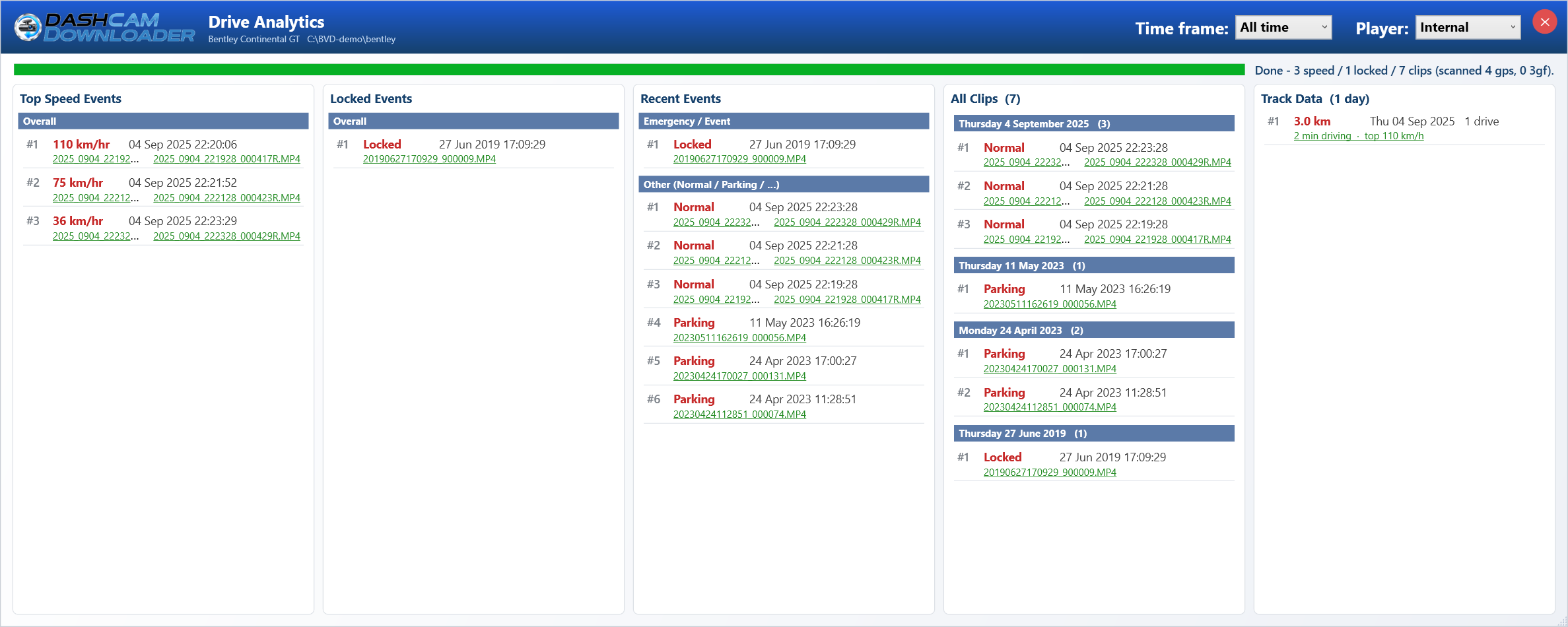
- Drive Analytics: your fastest moments and hardest knocks – today, yesterday and overall – and every event, one click from playing it.
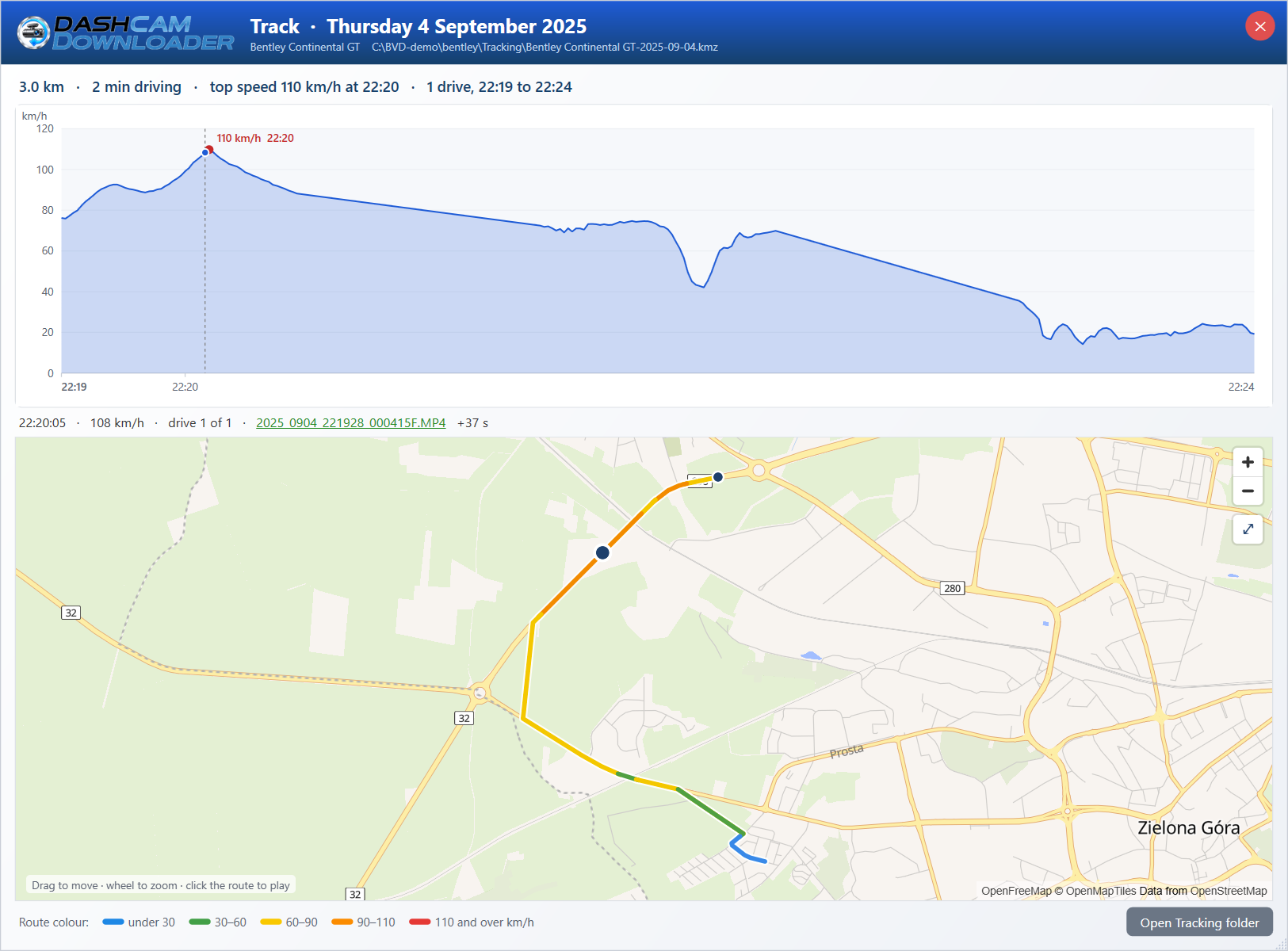
- Track Data: each day’s distance, driving time and top speed, with a speed graph and the route on a street map.
- Live View of a connected camera, and a health check that explains set-up problems.
Questions
Does my footage go to the internet or a cloud?
No. It goes straight from the camera to your PC over your own network. The app uploads nothing and needs no account – only the Microsoft Store licence.Then why does the camera need internet access?
That is the camera, not the app: BlackVue cameras check for the internet when they join a Wi-Fi network and switch their Wi-Fi off if they can’t reach it. A normal home connection is all it needs. More in Help.Can it save straight to my NAS?
Yes – choose a NAS folder (network share) as the save location. The app itself runs on a Windows PC, which needs to be on when the car is home.Do I need BlackVue Cloud?
No. The camera only needs to join your home Wi-Fi, which is set in the BlackVue app’s Cloud / Wi-Fi settings. No Cloud account or plan is used.What does it cost?
A one-time purchase in the Microsoft Store after a fully working 7-day trial. No subscription.Is it made by BlackVue?
No. Dashcam Downloader (formerly Blackvue Downloader) is an independent app by Gizmo Coding, first released in 2018.Try it with your own camera
Install it from the Microsoft Store, add your camera’s IP address, and watch the first clips arrive. The set-up guide walks through each step.
Try free for 7 days